
Is your tablet no longer charging at all, staying black and appearing dead after a deep discharge? In 1150 Fünfhaus, this happens faster than you think: The device lies unused in a drawer for several weeks, the battery falls below critical voltage, and suddenly nothing responds. In such cases, a professional diagnosis is crucial, as the battery is not always the sole culprit. At ClickInternet, we professionally check your iPad or tablet, without an appointment and with a free on-site diagnosis.
What to do if your tablet is no longer charging at all? Immediate Measures
- First, use a different, high-quality charging cable and a suitable power adapter, ideally not a weak USB port on a laptop.
- Leave the tablet connected to the charger for at least 30 to 60 minutes, even if nothing is initially displayed on the screen.
- Carefully check the charging port for dust, lint, or bent contacts, but do not scrape inside with metal objects.
- Attempt a forced restart, depending on the model, using the power button and volume button or home button.
- If the tablet gets hot, smells strange, or doesn't respond at all: immediately disconnect it from power and have it professionally checked.
Why a tablet that won't charge at all needs professional help
A tablet that appears completely dead after a deep discharge can have several causes: a deeply discharged lithium-ion cell, a defective charging electronic, a damaged USB-C or Lightning port, or a motherboard issue. DIY attempts with powerful power adapters, cheap cables, or self-opening can further damage the battery, flex cable, display, and circuit board.
- The display remains black, even though the tablet has been connected to the charger for a long time.
- The device briefly shows a battery symbol but does not start completely.
- The tablet gets warm while charging but still doesn't charge up.
- The charging port is loose, only responds at certain angles, or no longer recognizes a cable.
ClickInternet: Your Expert for Tablets that no longer charge at all (dead after deep discharge) in Vienna
From 1150 Fuenfhaus, our two Viennese branches in 1050 Margareten and 1090 Alsergrund are easily accessible by subway or car. If your tablet no longer starts at all after a deep discharge, you can simply drop by without an appointment. Our technicians check the battery, charging port, charging IC, software status, and possible short circuits directly on site. We complete many repairs as an express service, usually within about 60 minutes, so you don't have to go without your device for long.
ClickInternet is also an A1 Partner and stands for reliable repairs, transparent advice, and clean work. Our diagnosis is free: We examine your device, clearly explain what's wrong, and honestly tell you if a repair is worthwhile. Whether it's an iPad, Samsung Galaxy Tab, Lenovo Tablet, Huawei MatePad, Xiaomi Pad, or another model – we help you quickly and easily.
What does it cost for a tablet that no longer charges at all (dead after deep discharge) at ClickInternet?
The cost depends on why your tablet is no longer charging. Sometimes a professional cleaning of the charging port is sufficient, sometimes the battery is deeply discharged or defective, and in other cases, the charging port or a component on the circuit board needs to be checked. That's why we don't quote flat rates out of the blue. At ClickInternet, you first get a free on-site diagnosis. After that, we explain the cause and tell you the exact price before we start the repair. This way, you always know what to expect beforehand – fair, transparent, and with no hidden costs.
Short waiting time? Take passport photos with you!
While your device is being repaired, you can use the waiting time: We offer biometric passport photos for immediate pickup - only EUR 12.90 for 6 professional photos. Perfect for passports, driver's licenses, residency permits, or e-cards.
Tablet no longer charging at all (dead after deep discharge) in 1150 Fuenfhaus - Visit us now!
If your tablet in 1150 Fünfhaus is completely dead and no longer charging, don't wait too long: the sooner we check the device, the better the chances of a quick solution and retaining your data. From 1150 Fuenfhaus, our two Viennese branches in 1050 Margareten and 1090 Alsergrund are easily accessible by subway or car. You don't need an appointment – just drop by, bring your tablet and charging cable, and we'll look at the problem immediately. You can find us at Reinprechtsdorfer Straße 70, 1050 Margareten, open Mon-Thu 10:00-20:00 and Sat 10:00-19:00. Our second branch is at Fuchsthallergasse 2, 1090 Alsergrund, open Mon-Thu 9:30-20:00 and Sat 9:30-19:00. ClickInternet is your fast, local point of contact in Vienna – we'll bring your tablet back to life if technically possible.
Frequent Questions about Tablets that no longer charge at all (dead after deep discharge)
How long does the repair take?
Most repairs are done directly
on-site in about 60 minutes. You can
wait for it or grab a coffee.
How much does the repair cost?
We first perform a free diagnosis
and tell you the exact price before we
start. No hidden costs.
Do I need an appointment?
No! Just drop by without an appointment -
at our branch in 1050 Margareten or
1090 Alsergrund. We'll help you immediately.
Is there a warranty on the repair?
Yes! As a certified A1 Partner, we offer
first-class service with a warranty
on all performed repairs.
What if my device cannot be repaired?
We will inform you honestly and discuss
alternatives - for example, a tested
refurbished device from our shop.
Wähle deine Filiale in Wien
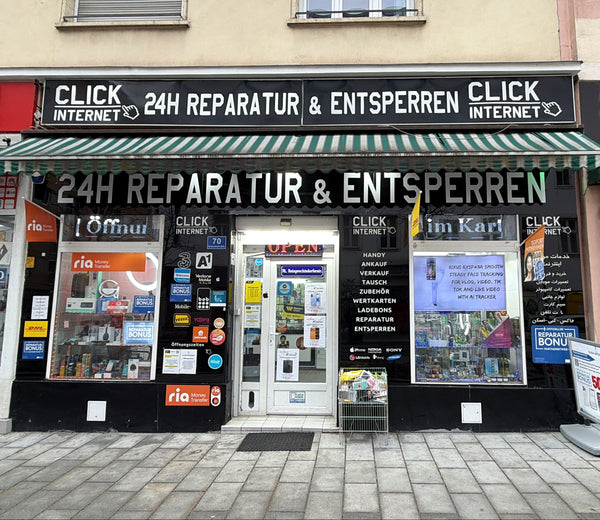
Filiale Margareten
Reinprechtsdorfer Straße 70

Filiale Alsergrund
Fuchsthallergasse 2 1090 Wien
Gerät defekt? Wir retten es!
Komm einfach ohne Termin in eine unserer Filialen in Wien. Wir bieten Express-Reparatur und Reparaturbonus zum Bestpreis.
Jetzt Kontakt aufnehmen
Was sagst du dazu?